Skincake Font Review: Elevating Handmade Brand Identity
I was sitting at my desk late Tuesday night, staring at a half-finished mockup for a new line of artisanal soy candles. The label design felt flat. I had the imagery, the color palette was warm and inviting, but the typography lacked that "wow" factor that stops someone from scrolling past an Etsy listing. That’s when I remembered downloading Skincake. It’s one of those modern and fancy display fonts perfect for posters, logos, magazines, book covers, banners, and many more applications where you need immediate visual impact. I decided to stop overthinking and just drag Skincake into my design software to see how it would transform the candle label.
If you are a crafter, handmade seller, or printable creator looking to elevate your product presentation, this review is for you. We often talk about materials—wax quality, paper weight, sticker vinyl—but we rarely discuss how a single typeface can shift the perceived value of your entire shop. After testing Skincake on various real-world product mockups, from boutique packaging to digital invitation templates, here is my honest take on how this font performs in the wild.
Skincake for Elegant Product Labels and Boutique Packaging
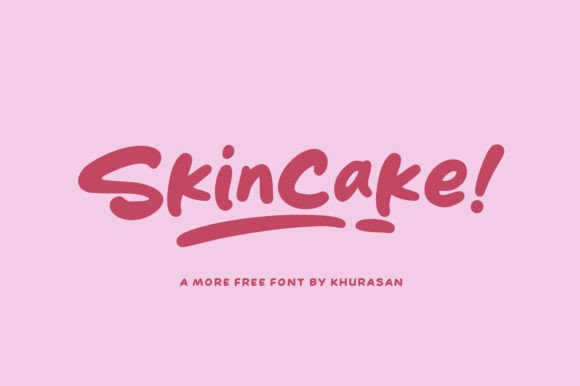
When I first pulled up Skincake, its visual personality jumped out immediately. It isn’t just a font; it’s a statement. The curves are fluid yet structured, giving it a luxurious feel that works beautifully for high-end branding. I applied it to my candle labels, specifically for the brand name and scent descriptors. Unlike rigid sans serif fonts that can feel corporate, or overly complex script fonts that can be hard to read, Skincake strikes a balance between approachable elegance and modern sophistication.
For makers who sell physical goods like soaps, bath bombs, or jewelry, first impressions are everything. A clean, fancy display font like Skincake tells the customer before they even touch the product that this item is premium. I tested it on both matte black labels with gold foil accents and cream-colored kraft paper tags. On the dark background, the white letters of Skincake popped with incredible clarity, while on the kraft paper, it added a touch of rustic chic without losing readability. It can easily be matched with minimalist icons or simple line art to create a cohesive brand identity that looks professional rather than amateur.
However, remember that Skincake is primarily a display font. It is designed to catch the eye, not to fill pages with text. For ingredient lists or care instructions on your packaging, pair it with a clean sans serif font. This contrast ensures that while the brand name screams "luxury," the practical information remains legible and trustworthy. This combination is crucial for maintaining credibility with customers who need to know exactly what they are buying.
Skincake in Digital Downloads and Printable Stationery
As a creator of digital products, I spend a lot of time designing assets that other users will print themselves. Whether it’s wedding invitations, planner pages, or wall art, the font needs to hold up well at different sizes. I took Skincake and created a series of printable birthday invitations and greeting cards. The results were stunning. Because it is a modern and fancy display font, it adds instant flair to digital files that might otherwise look generic.
I tested the font in various file formats and sizes. For large-format prints like banner designs or poster art, Skincake shines. Its distinct character shapes remain sharp and recognizable even when scaled up. But what about smaller elements? I tried using it for tiny details on a sticker sheet preview image. Here, I found that while it looks beautiful in full-size mockups, it requires careful consideration when used for very small cuts or dense text areas. If you are designing SVG files for Cricut or Silhouette users, Skincake is fantastic for main titles, names, or short phrases, but it may become difficult to cut cleanly if the letterforms are too intricate and the material is thin vinyl.
For digital downloads, such as Canva templates or Adobe Illustrator files, Skincake adds significant value. Buyers love fonts that look expensive. By including Skincake in your design asset packs, you are offering a tool that helps them achieve a polished, editorial look with minimal effort. It pairs wonderfully with simple geometric shapes or floral illustrations, making it versatile for seasonal products like holiday tags or summer sale graphics.
Skincake for Social Media Graphics and Web Design Elements
In today’s market, your online presence is just as important as your physical product. I used Skincake to update the headers on my online shop and some Instagram story templates. The goal was to create a consistent visual language across all platforms. Skincake worked seamlessly here because it is a modern and fancy display font perfect for... well, almost any context where you want to grab attention quickly.
When designing social media graphics, readability on mobile screens is key. Skincake’s spacing and stroke width are well-calibrated for digital viewing. I used it for quote graphics and announcement banners. It stands out against busy backgrounds better than thinner fonts. However, avoid using it for long paragraphs of text. It is not suitable for body copy. Instead, use it for headlines, pull quotes, or call-to-action buttons. This strategic use keeps your audience engaged without overwhelming them with decorative text.
I also experimented with pairing Skincake with a bold sans serif font for web design elements. The contrast created a dynamic hierarchy that guided the viewer’s eye naturally. This technique is especially effective for landing pages promoting new collections or limited-edition drops. By mixing the fancy display nature of Skincake with the stability of a neutral font, you create a design that feels both creative and reliable.
Practical Considerations for Commercial Use and Licensing
Before you start slapping Skincake on every product you make, there are a few practical things to keep in mind. First, always check the license agreement. While this falls under the category of Freebies, not all free fonts allow for commercial use without attribution or specific restrictions. Some may permit use on physical merchandise, while others limit you to personal projects only. As a seller, you need to be certain that your use case is covered to avoid legal issues down the road.
Secondly, consider the technical aspects of the font file. Does it include alternate characters, swashes, or ligatures? These features can add unique touches to your designs, allowing you to customize names or titles with extra flair. I noticed that Skincake has some nice stylistic alternates that made my logo designs feel more bespoke. Always explore these options before settling on the default glyphs.
Finally, think about your target audience. If you are selling to a demographic that prefers minimalist, industrial, or ultra-modern aesthetics, Skincake might feel too ornate. It leans towards elegant, romantic, or boutique styles. Knowing your niche will help you decide if this font aligns with your brand voice. For example, it is less likely to fit a rugged outdoor gear brand but would be perfect for a wedding stationery shop.
Final Verdict on Using Skincake in Your Creative Workflow
After extensive testing on labels, cards, digital templates, and web elements, I can confidently say that Skincake is a valuable addition to any maker’s toolkit. It brings a level of polish and professionalism that is hard to achieve with standard system fonts. Its versatility allows it to bridge the gap between traditional elegance and contemporary design trends.
Whether you are designing a single candle label or a full suite of wedding invitations, Skincake delivers. Just remember to use it wisely: reserve it for display purposes, pair it with readable body fonts, and always verify your licensing rights. When used correctly, it transforms ordinary products into desirable treasures. If you are looking to inject some fancy flair into your handmade business, give Skincake a try. You might find, as I did, that it is the missing piece in your design puzzle.